Configuring ReqXChanger
Several parameters must be filled in order to start creating requirements. To open ReqXChanger Options from Rhapsody, right-click on the Project and select the menu ReqXChanger > Open Options Dialog.
- Configuring ReqIF Options:
- Select the option ReqIF File
- Set the ReqIF Source File from which requirements will be created in Rhapsody.
- Configuring Rhapsody Options:
- Set the transformation Mode. This will load a preset of recommended options for a specific tool or purpose.
Select the Polarion Mode.
If other properties are modified, the Custom mode will be automatically selected.
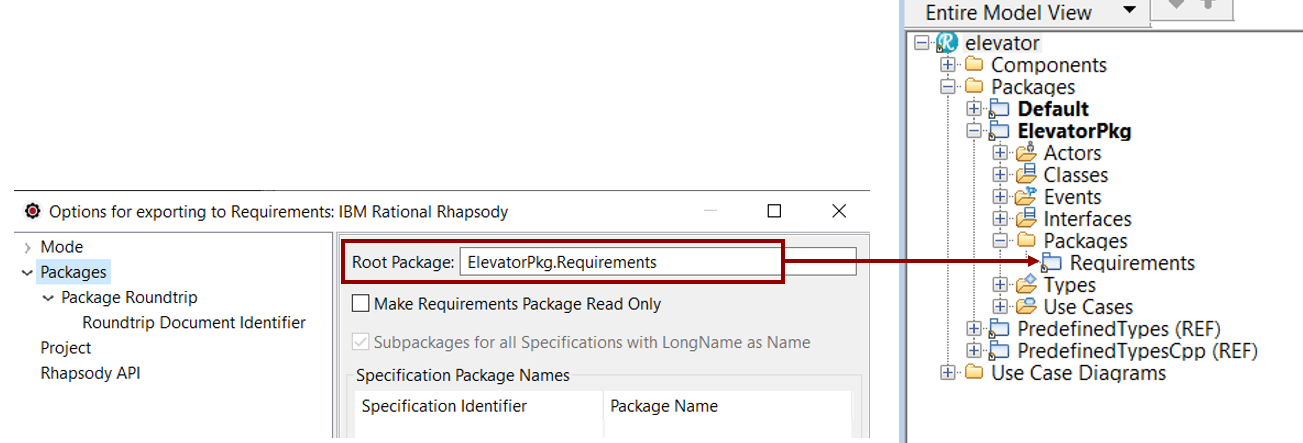
- Set the Package where to create Requirements. Select the Packages > Root Package option.
In the following screenshot, Requirements will be created in the "Requirements" Package, owned by the "ElevatorPkg"
- Unselect the checkbox Export only Specifications with Specification Package Name.
- Select the menu Rhapsody API. Set the Rhapsody.jar file path. It is the path to the Rhapsody API jar archive.
The path can be found from the active Rhapsody application by using the following steps:
- Select the Help menu.
- Select About Rhapsody.
- Select the button Version Details.
- Look for OMROOT property.
The Options page can be closed once all parameters have been specified, by clicking the OK button.